
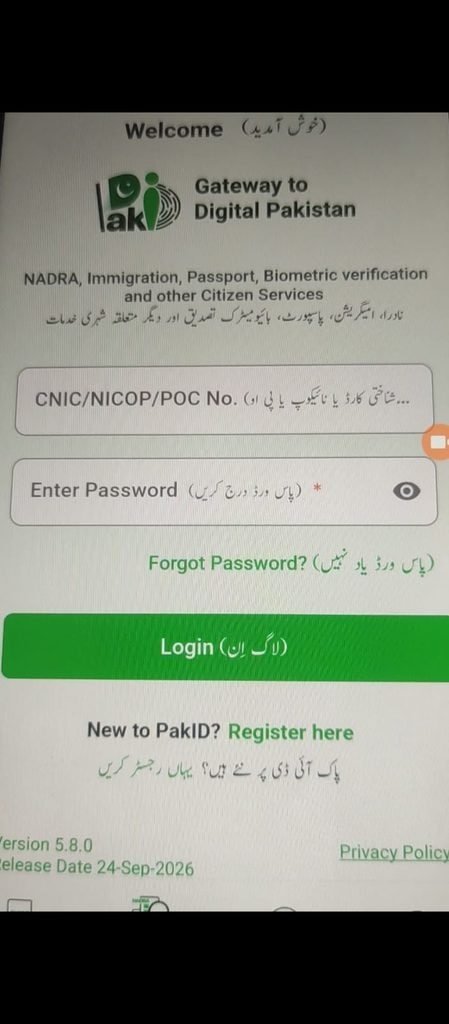
Pak identity is NADRA’s Online identity issuance service for Pakistani citizens that provides an end-to-end solution for applying for identity card are other thing like passport and frc , and also _
You can access Pakistan’s official identity services online through the NADRA PakID Portal to apply for, renew, or modify identification documents from home.
What is NADRA PakID?
NADRA PakID is an online service for registration or renewal of various identity documents. Applications can be applied through PakID mobile app (Android & iOS).
How to create PAKID account ?
YOU create account use the method that i share in this video and also read full article that help you
There are some Problem in creating account that i share this video and article how to fix it and create Pak identity account –
Through PakID mobile app, you can apply for:
National ID Card for Overseas Pakistanis (NICOP): Fresh – Renewal – Modification – Reprint/Lost – Update of Non-Printable Field Click for more details.
CNIC: Renewal – Modification – Reprint lost – Update of Non-Printable Field Click for more details.
NOTE: First time CNIC of the applicant can be initiated through blood relative’s account and applicant along with the blood relative have to visit NADRA center for completing the rest of the steps.
Pakistan Origin Card (POC): Fresh – Renewal – Modification Click for more details.
Child Registration Certificate (CRC): Fresh – Modification – Reprint Click for more details.
FRC: Click for more details.
Cancellation Certificates: Due to death – Due to Surrender – Due to Resumption – Divorce Click for more details.
How does NADRA PakID system work?
PakID Mobile Application allows you to easily obtain your Identity documents in few simple steps:
STEP 1: Registration
Register your account on PakID Mobile Application (available on Android and iOS).
STEP 2: Select Application Category
Provide Required Details
Choose the required identity document type and provide all the information in each section i.e. Application details, Personal details, Relative details, Address details, Card delivery information etc.
STEP 3: Biometric Verification (Facial/Fingerprints)
Complete facial/fingerprints verification through photo/fingerprints capturing
STEP 4: Capture Photograph & Signatures
Capture your live photograph, that will be printed on your ID card and provide either digital signature on the app or upload from your phone gallery.
STEP 5: Submit Application
After completing all the steps, submit the application
STEP 6: Approval & Payment
After the approval of the application by NADRA, you will be notified via the app to pay the fee of the application. Once the fee is paid, you will receive the required identity document in the stipulated time.
Note: Payment can be made through Credit & Debit cards. Moreover, for CRC, CNIC and FRC, fees can also be paid through Raast, e-Sahulat, Easypaisa and Jazzcash.
Pak identity is NADRA’s Online identity issuance service for Pakistani citizens that provides an end-to-end solution for applying for identity card _
You can access Pakistan’s official identity services online through the NADRA PakID Portal to apply for, renew, or modify identification documents from home.
Core Services AvailableIdentity Documents:
Apply for or renew a Computerised National Identity Card (CNIC), National Identity Card for Overseas Pakistanis (NICOP),
Pakistan Origin Card (POC), and Child Registration Certificate (CRC).
PakID Mobile App: Use the official mobile platform for biometric verification via your camera, live photo capture, digital signatures, and encrypted online payments.
Single Sign-On (SSO): Log in once using your NADRA-verified digital identity to safely access multiple connected government, tax, and passport services. applying from inside Pakistan or as an overseas Pakistani
you can apply and get specific document (CNIC, NICOP, FRC, etc.) you learn the exact step-by-step requirements and fees.
What is the PakID Mobile Application?
The PakID Mobile Application is an official app by NADRA that allows Pakistani citizens and overseas Pakistanis to apply for identity documents, update their details, track applications and manage services directly from their mobile devices.
How do I apply for a new CNIC or NICOP through the app?
After installing the app, create or log in to your PakID account,
choose the service you need (New, Renew, Update or Reprint), fill in the form, upload required documents,
capture your photo/biometric (where applicable) and submit the application with online payment.
Is the PakID Mobile Application secure?
yes
Where can I download the app?
You can download the PakID Mobile Application by scanning the QR codes above or by searching for “PakID” on the Apple App Store and Google Play Store.
Core Services AvailableIdentity Documents:
Apply for or renew a Computerised National Identity Card (CNIC), National Identity Card for Overseas Pakistanis (NICOP),
Pakistan Origin Card (POC), and Child Registration Certificate (CRC).
PakID Mobile App: Use the official mobile platform for biometric verification via your camera, live photo capture, digital signatures, and encrypted online payments.
Single Sign-On (SSO): Log in once using your NADRA-verified digital identity to safely access multiple connected government, tax, and passport services. applying from inside Pakistan or as an overseas Pakistani
you can apply and get specific document (CNIC, NICOP, FRC, etc.) you learn the exact step-by-step requirements and fees and more about paks id read more articele on tayyabtip.
Pak identity app password forgot
What is the PakID Mobile Application?
The PakID official app by NADRA that allows Pakistani citizens and overseas Pakistanis to apply for identity documents, update their details, track applications and manage services directly from their mobile devices.
HOW to Create Pak identity account
Create Pak identity account using the easy method that I share with you
Is the PakID Mobile Application secure?
Yes. The app uses encrypted communication, secure document handling and biometric verification on supported devices to protect your personal information and ensure only you can access your identity services.